OP
OP stands for Operate Parameter. It is the way to operate on variables in vt, generally used to perform a calculation on 1~2 variables and obtain a result. You can obtain different results by setting different operation modes, as long as the operation and the variable types are compatible.
Types
OP is divided into two types:
| Type | BB | Parameter Operation |
|---|---|---|
| When to calculate | Calculated when the BB is triggered | Calculated when needed downstream |
| How to add | Same as adding other BBs | Right-click menu Add Parameter Operationor press the shortcut Alt + P |
| How to configure | Right-click Edit Settingsor press the S shortcut while selected | Configure directly when creating or left double-click |
Configuration
The OP configuration interface is as follows:
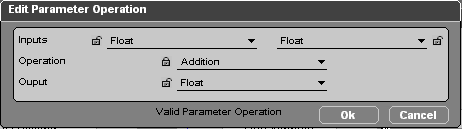
The main logic of an OP is: use the two variables from Inputs, through the operation method of Operation, to obtain the result in Output. For example, the configuration in the figure means adding two Float values together to get a new Float value.
Type Compatibility
The operation method and variable type must be compatible, otherwise the operation cannot be performed. For example, you cannot add a Vector 3D and a Float.
The way to judge whether it is feasible is simple: if the operation cannot be performed, the OK button will not appear on the configuration page.
Hint
To find the operations supported by a certain type, or to find the types supported by a certain operation, you can use the 🔒 lock button on the configuration interface. After locking part of the configuration, the remaining configuration will adapt automatically, and the dropdown options will only show the available types.
The None Type
Some operations may only need one input variable to proceed, for example Get Position only needs to be given a 3D Object. But an OP has two input variables by default. In this case, to configure correctly so that the OK button appears, the other input variable can be set to None, indicating that this variable is not used.